> For the complete documentation index, see [llms.txt](https://docs.dataplex-consulting.com/llms.txt). Markdown versions of documentation pages are available by appending `.md` to page URLs; this page is available as [Markdown](https://docs.dataplex-consulting.com/data-catalog/rosterguard-app.md).
# RosterGuard: Provider Data Integrity
**Get RosterGuard** | [Install from Snowflake Marketplace](https://app.snowflake.com/marketplace/listing/GZT1Z7QRT1O9) (30-day free trial included)
### The problem
Excluded providers keep getting billed. The OIG's List of Excluded Individuals/Entities (LEIE) is the list you're required to screen against, but only about **1 in 10** exclusion records carries an NPI. So the check most teams write first, roster NPI against LEIE NPI, is blind to roughly **90%** of the list. Among excluded nurses it's worse: under 1% carry an NPI. Miss one, and you're paying a provider you're not allowed to.
### What RosterGuard does for you
RosterGuard screens any provider roster against the OIG exclusion list **plus five CMS integrity signals (six checks in all)**, entirely inside your Snowflake account. It closes the NPI gap with tiered name + date‑of‑birth matching, grades every hit by how much evidence stands behind it, and gives your reviewers a defensible audit trail:
* **Catch the exclusions an NPI check can't**: name + DOB matching finds excluded providers whether or not their record has an NPI.
* **Know how sure to be**: every hit is graded **Strong**, **Likely**, or **Possible**, with the exact fields that matched, agreed, or conflicted shown alongside.
* **Defend every decision**: each review records a reviewer, timestamp, and note, and every screen stamps the exact source vintages it ran against. When a surveyor asks "which list did October's screen use," the answer is on the screen.
* **Nothing leaves your account**: your roster stays put; the app reads one table you pick, read‑only.
* **Watch the whole roster, not just exclusions**: deactivated NPIs, missing PECOS enrollment, Medicare opt‑outs, and revalidation deadlines surface on a health dashboard.
{% hint style="success" %}
**Get RosterGuard** | [Snowflake Marketplace](https://app.snowflake.com/marketplace). The free trial is the full application: every match strength, every signal, exports included, over 30 days (screening is capped at 1,000 providers on the trial).
{% endhint %}
### What it screens against
**Six checks:** the OIG LEIE exclusion list, plus five CMS integrity signals: NPPES deactivations, PECOS enrollment presence, Medicare opt‑out affidavits, Order & Referring eligibility, and revalidation due dates.\
**Always current:** reference data refreshes on each source's own release cadence (LEIE monthly, NPPES weekly, CMS feeds per cadence; PECOS is a quarterly snapshot).\
**Always dated:** every screen pins the exact vintage of every source it used, so you always know which LEIE file a screen ran against.
Plain‑English detail on each source: [What It Checks](/data-catalog/rosterguard-app/data-dictionary.md).
## How matching works
Every match is graded by how much evidence stands behind it, shown as one of three confidence levels:
* **Strong**: same provider ID (exact NPI match against an exclusion record).
* **Likely**: same name and date of birth.
* **Possible**: same name and state only, with no date‑of‑birth corroboration. Advisory; confirm identity before acting.
Each hit carries per‑field evidence: which fields matched exactly, which agreed after normalization, which conflict, plus the exclusion's authority and a plain‑language description of what it was for. Why name + DOB matching, the three confidence levels, and the measured recall behind them: [Understanding Matches](/data-catalog/rosterguard-app/methodology.md).
## See it work
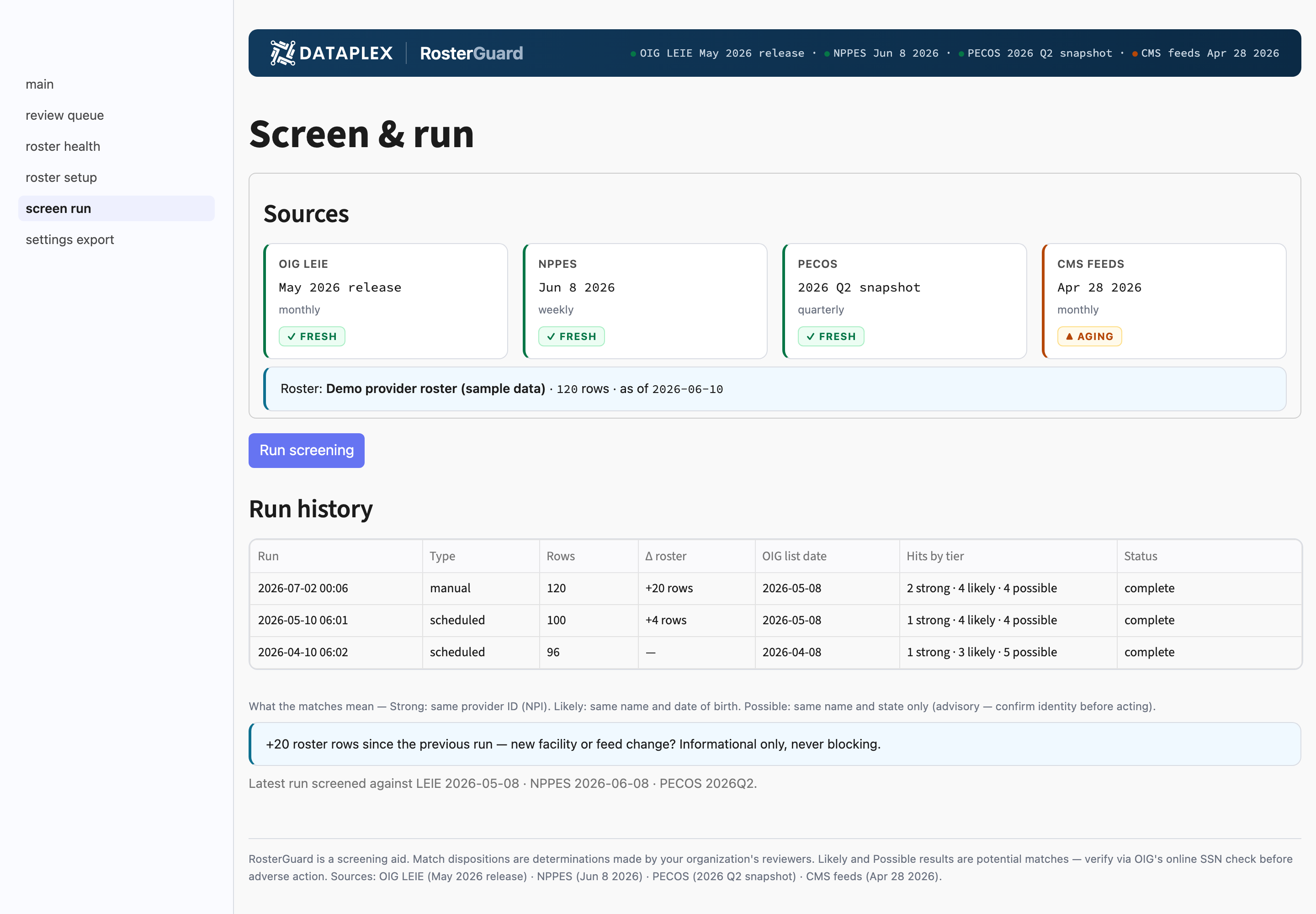
The Screen & run page shows the exact vintage of every source before you run, then rows screened and a breakdown of hits by strength (Strong, Likely, Possible) when it finishes.
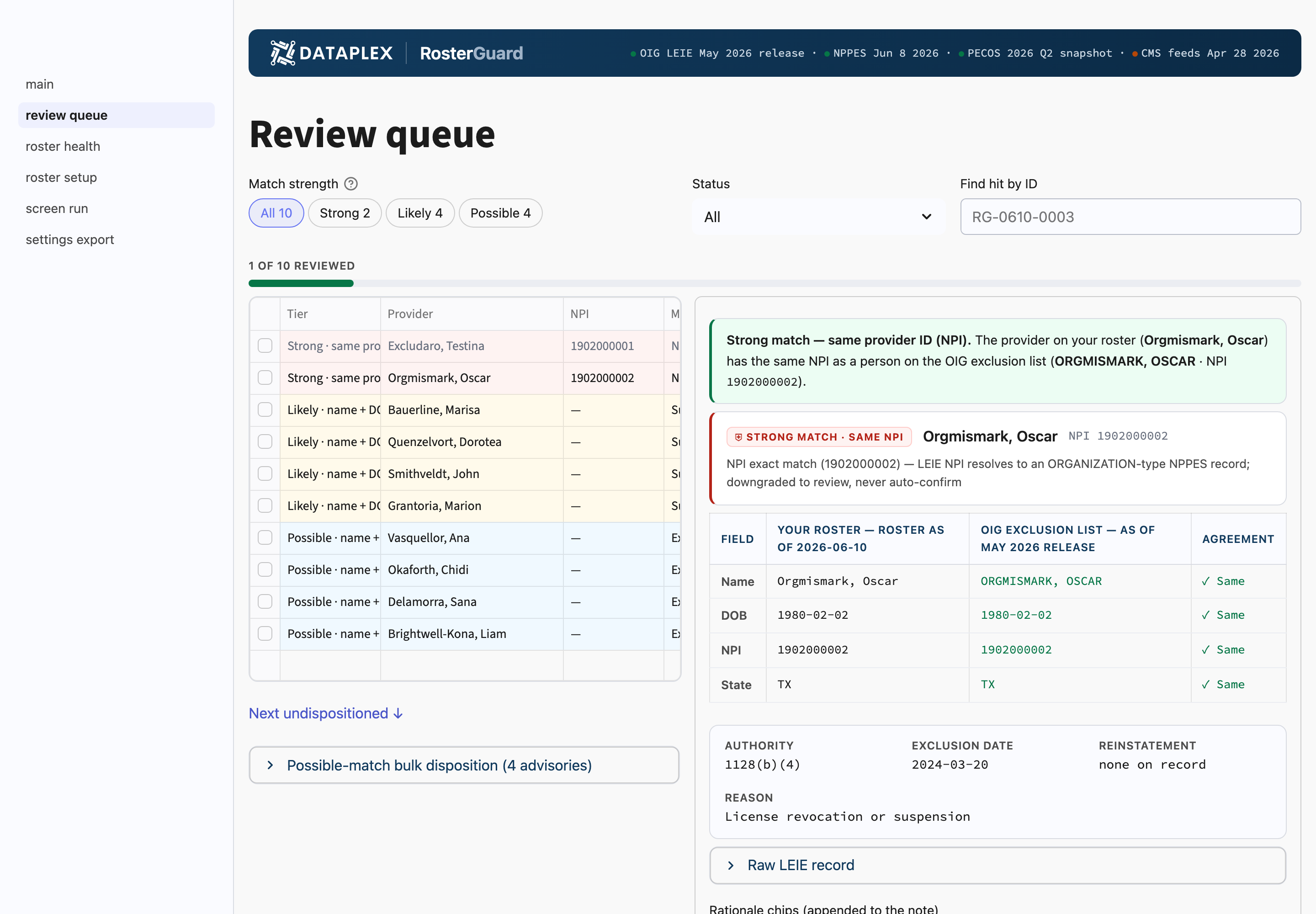
Each hit opens an evidence panel showing which fields matched exactly, which agreed after normalization, and which conflict, so a match is a decision you can explain, not a black box.
## Try the demo first
The app ships with a **demo roster of 120 synthetic providers** (no real people). It contains **10 planted exclusion matches: 2 Strong, 4 Likely, and 4 Possible**, so you can see every confidence level and run the full screen → review → disposition → export flow before you connect any real data. Pick **Use demo roster** on the Roster setup page; no table binding required.
## Plans & trial
| Plan | Price | Includes |
| ------------ | ---------- | ------------------------------------------------------------------------------------------------------------ |
| **Standard** | $7,500/yr | Up to 2,500 providers, all six checks, review queue, exports |
| **Pro** | $15,000/yr | Up to 10,000 providers, multi‑roster support, on‑demand re‑screens, quarterly methodology attestation letter |
Network‑scale (per‑provider‑screened) terms for organizations screening third‑party networks, and embedded/OEM use of screening outputs, are available; contact us.
**Trial:** the full application (every match strength, every check, exports included) over 30 days, with screening capped at 1,000 providers. The bundled 120‑provider demo roster exercises every confidence level out of the box.
[Install from the Snowflake Marketplace](https://app.snowflake.com/marketplace/listing/GZT1Z7QRT1O9) and run your first screen in about 15 minutes, with **no sales contact required**. To talk through network‑scale or embedded terms, reach us at (monitored inbox; a human replies).
{% hint style="warning" %}
RosterGuard is a screening aid. Match dispositions are determinations made by your organization's reviewers. Likely and Possible results are potential matches; verify via OIG's online SSN check before adverse action.
{% endhint %}
***
**RosterGuard docs:** [Quickstart](/data-catalog/rosterguard-app/quickstart.md) · [Using the App](/data-catalog/rosterguard-app/using-the-app.md) · [Understanding Matches](/data-catalog/rosterguard-app/methodology.md) · [What It Checks](/data-catalog/rosterguard-app/data-dictionary.md) · [Security & Plans](/data-catalog/rosterguard-app/security-and-plans.md)
---
# Agent Instructions
This documentation is published with GitBook. GitBook is the documentation platform designed so that both humans and AI agents can read, navigate, and reason over technical content effectively. Learn more at gitbook.com.
## Querying This Documentation
If you need additional information that is not directly available in this page, you can query the documentation by asking a question.
Perform an HTTP GET request on the following URL with the `ask` and `goal` query parameters:
```
GET https://docs.dataplex-consulting.com/data-catalog/rosterguard-app.md?ask=&goal=
```
`ask` is the immediate question: it should be specific, self-contained, and written in natural language.
`goal` is what the user is ultimately trying to achieve, the reason they need the answer. Sharing it helps GitBook give you a better, more relevant answer. A goal is most helpful when it describes the outcome the user wants rather than restating the question. For example, with `ask=how do I create an API token`, a goal like `automate deployments from our CI pipeline` lets GitBook tailor the answer to that use case.
The response will contain a direct answer to the question and relevant excerpts and sources from the documentation.
Use this mechanism when the answer is not explicitly present in the current page, you need clarification or additional context, or you want to retrieve related documentation sections.