> For the complete documentation index, see [llms.txt](https://docs.dataplex-consulting.com/llms.txt). Markdown versions of documentation pages are available by appending `.md` to page URLs; this page is available as [Markdown](https://docs.dataplex-consulting.com/data-catalog/facilityguard-app/using-the-app.md).
# Using the App
This page walks FacilityGuard's five screens in the order a monitoring workflow uses them: connect your facility list and understand its disclosure coverage, work the change watchlist, drill into a facility's disclosed ownership chain, read the portfolio's health at a glance, and export your evidence. Throughout, FacilityGuard keeps one promise: it shows what CMS filings disclose, flags where they stop, and records when each change was detected, never pretending a detection date is a transaction date.
## Portfolio setup
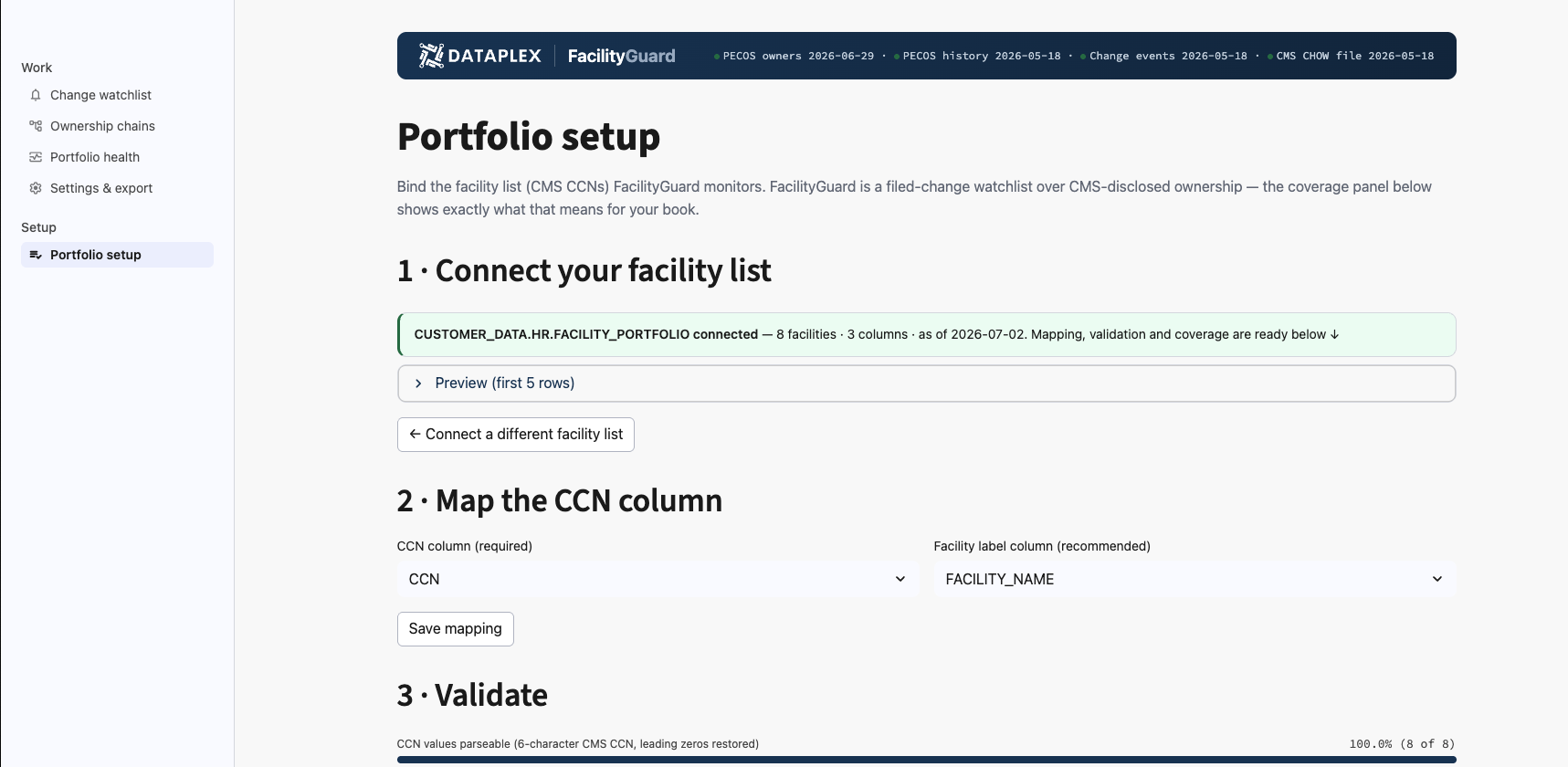
Portfolio setup connects your facility list (one row per CCN) and immediately answers the question every new user should ask first: what can the federal filings actually tell me about *these* facilities? The coverage panel classifies each bound facility as fully disclosed, partially disclosed, dead-end (an upstream owner with zero federal disclosure), or no enrollment data, so you know, before citing anything, which chains are complete and which findings will need an "as disclosed in federal filings" qualifier.
To connect a list: (1) **Connect your facility list**: Snowflake's grant dialog opens; pick your CCN table and Save (read-only SELECT on that one table). The page then confirms the connection, naming the exact table you picked and its row and column counts. (2) **Map the CCN column** and **Save mapping**. (3) **Bind portfolio**. The coverage panel appears once the bind completes. Binds are capped by plan; over-cap counts are reported, never silently truncated. See [Quickstart](/data-catalog/facilityguard-app/quickstart.md) for the full walkthrough.
## Change watchlist
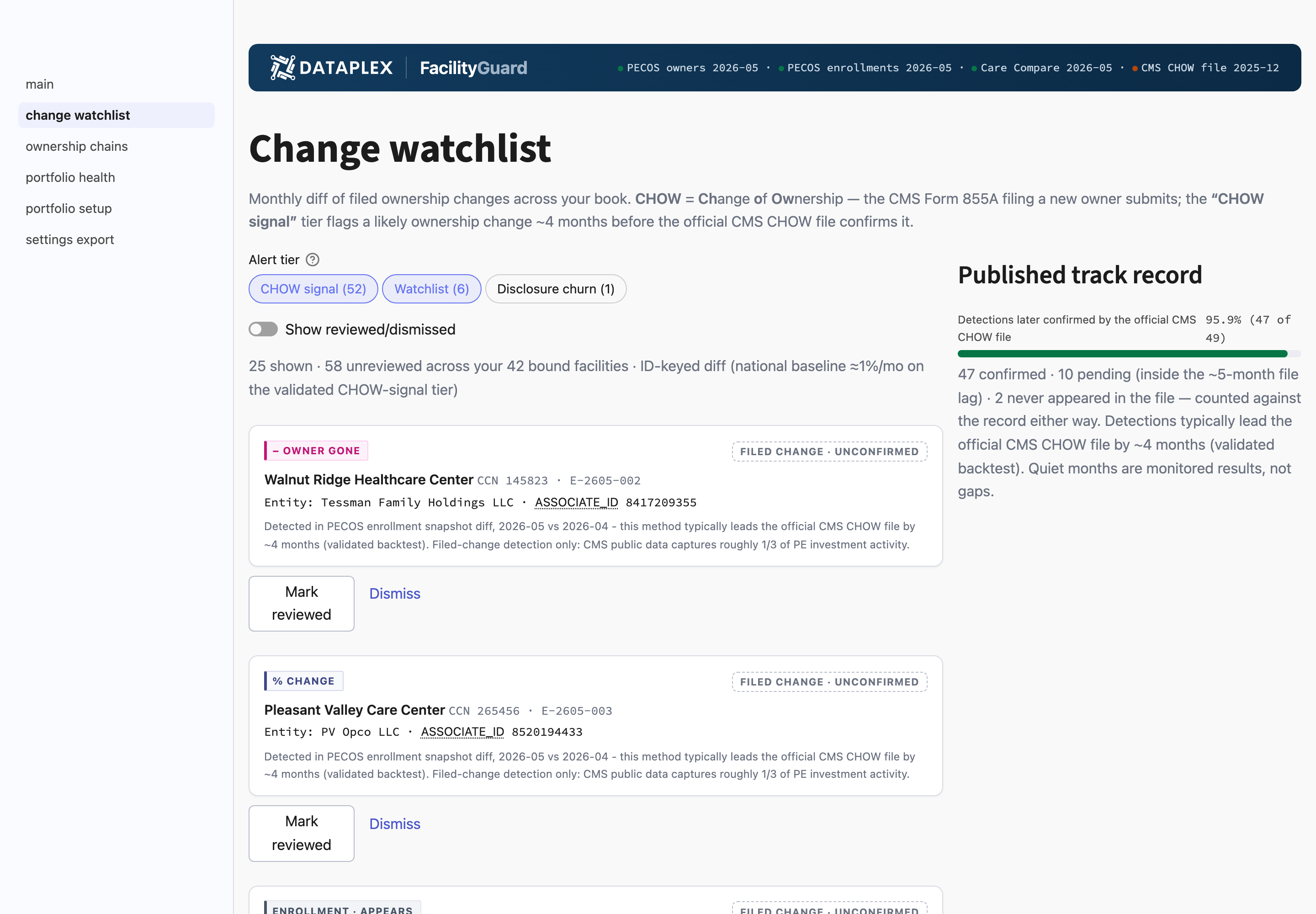
The watchlist is the alert feed: every ownership change for your facilities, tagged by type (owner appears, owner gone, percentage change, enrollment appears/gone) and graded so the validated signal leads. The feed defaults to the strong-signal and watchlist grades, with lower-stakes disclosure churn one filter away: kept and available, never deleted, never mixed into the signal by default. Each event carries its receipt (the pair of CMS publications it was detected between) and a confirmation chip that flips when the official CMS change-of-ownership file later publishes the matching event; the track record at the top shows how often early detections have been officially confirmed. Both review actions (mark reviewed and dismiss) write to the same append-only ledger: who looked, when, and what they concluded. A dismissal is a recorded determination, not a deletion, which is what makes the watchlist citable rather than just interesting.
## Ownership chains
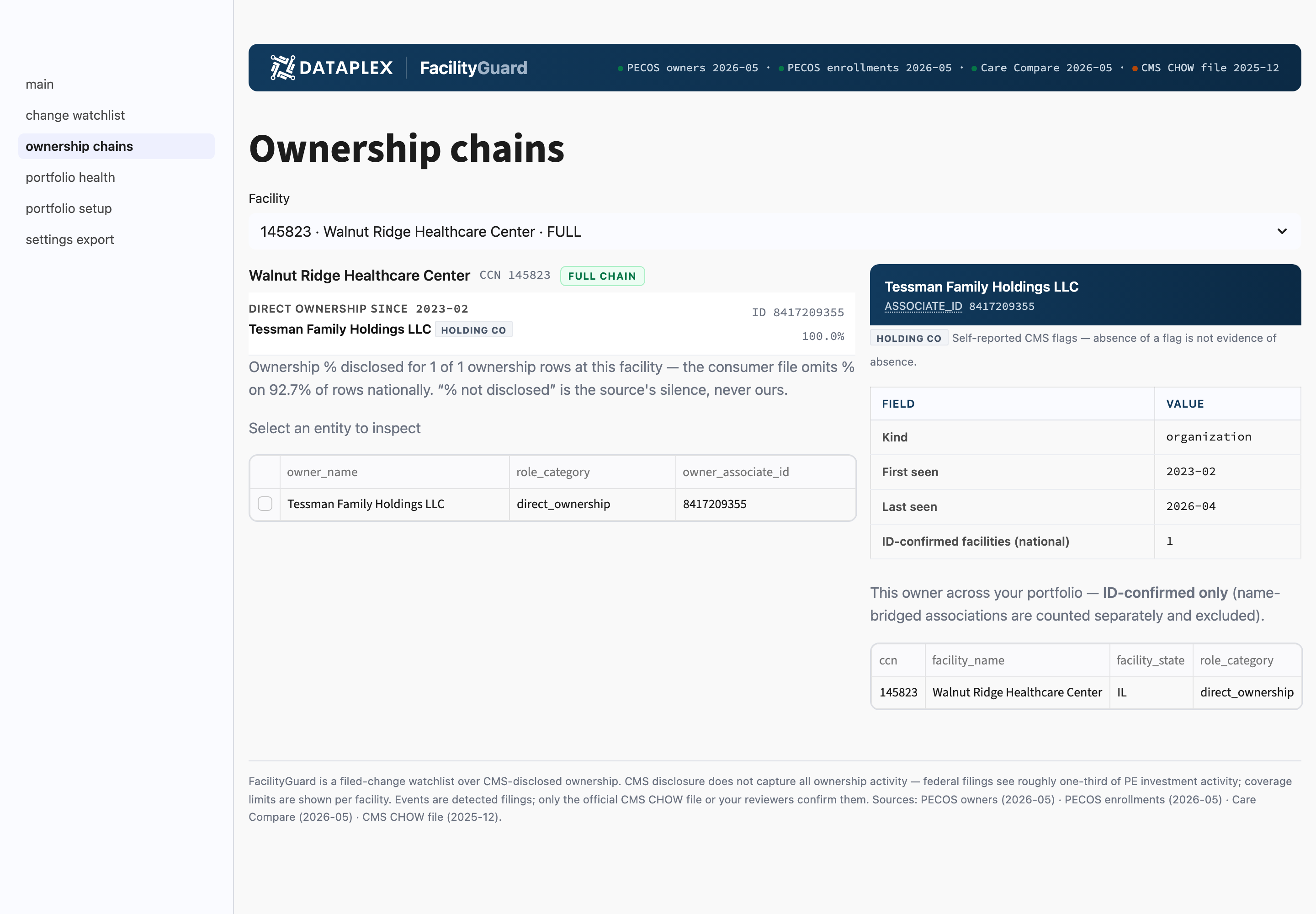
Ownership chains render a facility's disclosed structure as a tree: direct and indirect owners, roles, and disclosed percentages (with undisclosed percentages shown explicitly as "% not disclosed" rather than blank or zero), and a side panel for each owner showing its name, kind, CMS self-reported type flags (private equity, REIT, holding company), first- and last-seen dates, and how many facilities it's confirmed to own across the whole universe. Where disclosure stops, the chain ends in a labeled dead-end node; facilities with zero disclosed ownership show their receipts (the disclosure status and the date checked) instead of an empty chart. For an analyst building an ownership picture of a target, this is the difference between "here is the structure" and "here is the structure CMS has been told about, ending here."
## Portfolio health
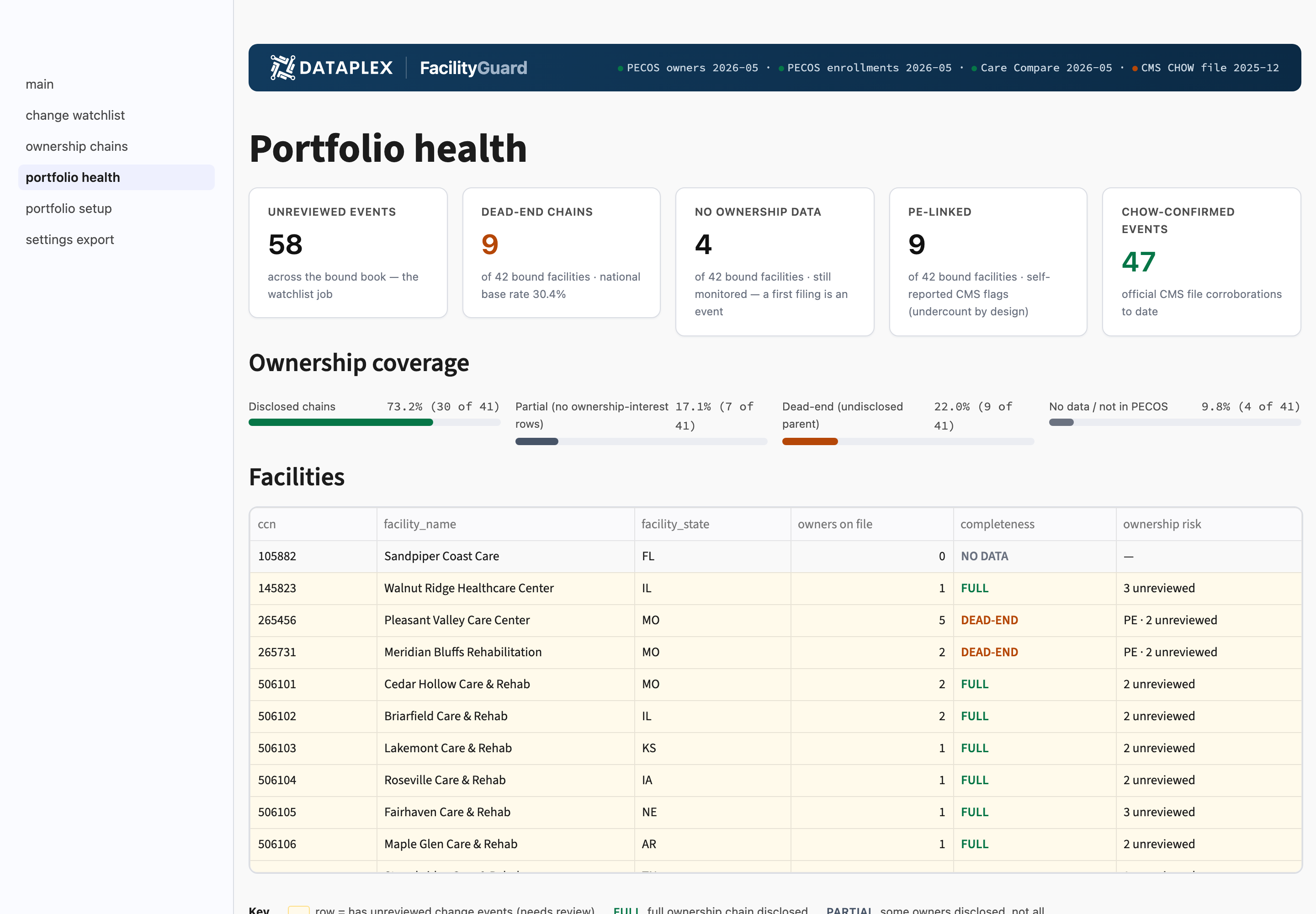
Portfolio health is the standing one-page answer to "anything moving in the book?": disclosure coverage across your facilities, recent activity as tiles (unreviewed and confirmed counts), dead-end and no-data counts shown against the \~30% national base rate (so you know whether your book is unusually opaque or just normal), and the source dates everything was last checked against. Each facility carries a completeness code, and a **color legend** spells out what each code means (full, partial, dead-end, no data) alongside the amber row-wash that marks facilities with unreviewed changes needing attention. It's built for a recurring monthly read, so a quiet month reads visibly as a quiet month with current data, not a stale page.
## Settings & export
Settings & export holds portfolio administration and your evidence artifacts: export the watchlist with its review ledger and per-event receipts for a data room, memo appendix, or downstream system. The page also shows your **license panel**: your current plan and a bound-facilities meter (the same limit the bind enforces), so the label always matches the plan you're on. Alongside it sit a freshness card per source with its current date (including the note that the official CMS change-of-ownership file publishes roughly five months behind filings *by design*, so its amber state means expected lag, not an error), and the run log: every bind and refresh with its date, counts, and the exact source dates used. That run log is the no-SQL answer to "what did we check, and against what." Your list, reviews, and run history live inside your Snowflake account and survive app upgrades; your work product is yours.
## Troubleshooting
### An event I expected isn't on the watchlist
**Cause:** the change may not have reached federal filings yet. Only filed changes can be detected, and CMS publishes monthly.
**Fix:**
1. Check the latest source date on Portfolio health. Detection can only be as current as the newest publication.
2. Check the facility's disclosure status: changes behind a dead-end owner are invisible to federal filings by definition.
### A confirmation chip never flipped
**Cause:** the official CMS change-of-ownership file lags filings by roughly five months, and not every detected event has an official counterpart: the official file covers formal changes of ownership only.
**Fix:**
1. Give confirmations time; chips flip when the official feed publishes the matching event.
2. Read the basis note under each event. It states the reason for the detection independent of official confirmation.
### Two owners look like the same company under different names
**Cause:** FacilityGuard identifies owners by their stable CMS-assigned ID, not by name, and CMS name strings vary heavily across filings. Unresolved name collisions are labeled rather than guessed at.
**Fix:**
1. Use the owner side panel: the ID-based name and facility footprint are authoritative.
2. See [Methodology](/data-catalog/facilityguard-app/methodology.md) for why name-based merging is deliberately avoided.
### An owner shows "(name not disclosed by CMS)"
**Cause:** a small share of owner links carry no name in any CMS filing to date.
**Fix:** the owner still has a stable identity, role, and footprint. The missing name is CMS's, and FacilityGuard says so rather than inventing one.
{% hint style="warning" %}
FacilityGuard is a filed-change watchlist over CMS-disclosed ownership, not complete ownership monitoring. Roughly a third of private-equity activity is visible in federal filings; chains that dead-end in the filings are flagged as dead ends. Changes are detected in CMS's monthly publications, so a detection date is a publication date, not the date a transaction closed.
{% endhint %}
***
**FacilityGuard docs:** [Overview](/data-catalog/facilityguard-app.md) · [Quickstart](/data-catalog/facilityguard-app/quickstart.md) · [Methodology](/data-catalog/facilityguard-app/methodology.md) · [What FacilityGuard Checks](/data-catalog/facilityguard-app/data-dictionary.md) · [Security & Plans](/data-catalog/facilityguard-app/security-and-plans.md)
---
# Agent Instructions
This documentation is published with GitBook. GitBook is the documentation platform designed so that both humans and AI agents can read, navigate, and reason over technical content effectively. Learn more at gitbook.com.
## Querying This Documentation
If you need additional information that is not directly available in this page, you can query the documentation by asking a question.
Perform an HTTP GET request on the following URL with the `ask` and `goal` query parameters:
```
GET https://docs.dataplex-consulting.com/data-catalog/facilityguard-app/using-the-app.md?ask=&goal=
```
`ask` is the immediate question: it should be specific, self-contained, and written in natural language.
`goal` is what the user is ultimately trying to achieve, the reason they need the answer. Sharing it helps GitBook give you a better, more relevant answer. A goal is most helpful when it describes the outcome the user wants rather than restating the question. For example, with `ask=how do I create an API token`, a goal like `automate deployments from our CI pipeline` lets GitBook tailor the answer to that use case.
The response will contain a direct answer to the question and relevant excerpts and sources from the documentation.
Use this mechanism when the answer is not explicitly present in the current page, you need clarification or additional context, or you want to retrieve related documentation sections.